Blogspage AI

WEB DEVELOPMENT · CUSTOM WEBSITES, WEB APPS & BUSINESS SYSTEMS

Custom Web Development for Websites, Web Apps & Business Systems

Design is how your business looks. This is how it works.

We build business websites, transactional websites, booking and order systems, web applications and business platforms — the working layer that captures leads, accepts payments, and gives your team the tools to run daily operations.

See What We've Built

Instant consultation with Sweety, our AI Business Consultant · No high-pressure sales calls.

One customer action, end to end

  1. Customer

    Someone enquires, books or places an order.

  2. Website

    The interface collects and validates what they entered.

  3. Business Logic

    Your rules decide what should happen next.

  4. Data

    The record is stored — customer, order or booking.

  5. Admin

    Your team sees it on a dashboard and acts on it.

  6. Payment / Notification

    Payment is taken where relevant, and confirmations go out.

What your business is left with

  • Lead captured
  • Payment handled
  • Team notified

Find the Level of System You Actually Need

Website through to SaaS MVP

Find your level
TWO SERVICES, ONE CLEAR BOUNDARY

How It Looks vs. How It Works

Design is how your business looks. Development is how your business works.

Web Design owns

  • Interface design
  • Layout & hierarchy
  • Typography
  • Colour system
  • Responsive layout
  • Brand presentation

Web Development owns

  • Forms
  • Bookings
  • Payments
  • Orders
  • Dashboards
  • Authentication
  • Databases
  • APIs
  • Workflows
  • Integrations

The same website has both layers. One decides what a visitor sees; the other decides what happens after they act.

If you need the visual experience and brand system first, explore our Web Design service. Explore our Web Design service

WHAT ARE YOU BUILDING?

Find the Level of System You Actually Need

Not every business needs the same thing. This is a ladder, not a menu — each level builds on the one before it.

  1. 1
    Level 1

    Business Website

    For businesses that need to be found and contacted.

    • Lead capture & contact forms
    • WhatsApp click-to-chat
    • Chatbot integrations
    • Appointment requests
    • CMS-managed content
    • Social integrations
    • Analytics & basic third-party integrations

    What the website does belongs here. How the website looks belongs primarily to Web Design.
  2. 2
    Level 2

    E-commerce, Booking & Transactions

    For businesses that take orders, bookings or payments online.

    • Product/service ordering & checkout
    • Payments (Razorpay, Stripe)
    • Bookings & reservation flows
    • Customer notifications
    • Order/reservation status
    • Admin management
  3. 3
    Level 3

    Web Applications

    For businesses that need logins, roles and dashboards.

    • Customer, staff & admin login
    • Dashboards & workflows
    • Role-based access
    • Customer portals
    • Operational data & business rules
  4. 4
    Level 4

    Business Platforms

    For organizations that run multiple roles, branches or tenants.

    • Multiple roles & multiple dashboards
    • Multi-tenant architecture
    • Multiple branches/businesses
    • Centralized administration
    • Operational workflows & integrations
    • Structured, scalable business rules
    See NextInn & ArogyaDiet as proof
  5. 5
    Level 5

    SaaS MVP

    For founders turning a product idea into a working MVP.

    • Build the core product
    • Launch quickly
    • Collect real user feedback
    • Improve based on usage
    • Continue expanding
    Explore Custom SaaS Development
WHAT'S BEHIND THE WEBSITE?

The System Behind the Interface

Every business website or application is powered by layers working together. Here's what actually happens behind the page a customer sees.

The full request path

  1. Customer / Staff / Admin
  2. Website / Application Interface
  3. Business Logic
  4. Database / Content
  5. APIs & Integrations
  6. Payments / Notifications / AI
  7. Admin / Operations

Different people get different doors into the same system.Authentication & Access

Customer, Staff, Admin and Super Admin can each see only what's relevant to them.

  • JWT
  • RBAC
  • Multi-tenant access control
  • Customer
  • Staff
  • Admin
One System

FrontendWhat your customers and staff actually see and interact with.

  • HTML
  • CSS
  • JavaScript
  • React
  • Next.js

BackendWhere your business rules and workflows are actually processed.

  • Node.js
  • Express
  • APIs

DataWhere structured business information lives — customers, orders, bookings.

The database is selected around the shape and needs of the product.

  • PostgreSQL
  • Supabase
  • MongoDB
  • Sanity CMS

APIs & IntegrationsYour website can communicate with the other tools your business already uses.

  • Payment providers
  • CRM
  • Email
  • WhatsApp
  • AI APIs

PaymentsPayment providers handle the transaction while your application manages the order or booking around it.

  • Razorpay
  • Stripe

CMSUpdate content without needing a developer for every change.

  • Sanity CMS

NotificationsPayment confirmations, booking confirmations, order status and admin alerts — sent automatically.

  • Email
  • WhatsApp
  • In-app

AIAI appears only where it does real work — generation, restoration, or an AI-assisted workflow.

  • OpenAI
  • AI APIs
SYSTEMS WE'VE BUILT

From Websites to Working Systems

Not a portfolio of screenshots — proof that the architecture on this page is real. Each build demonstrates a different capability.

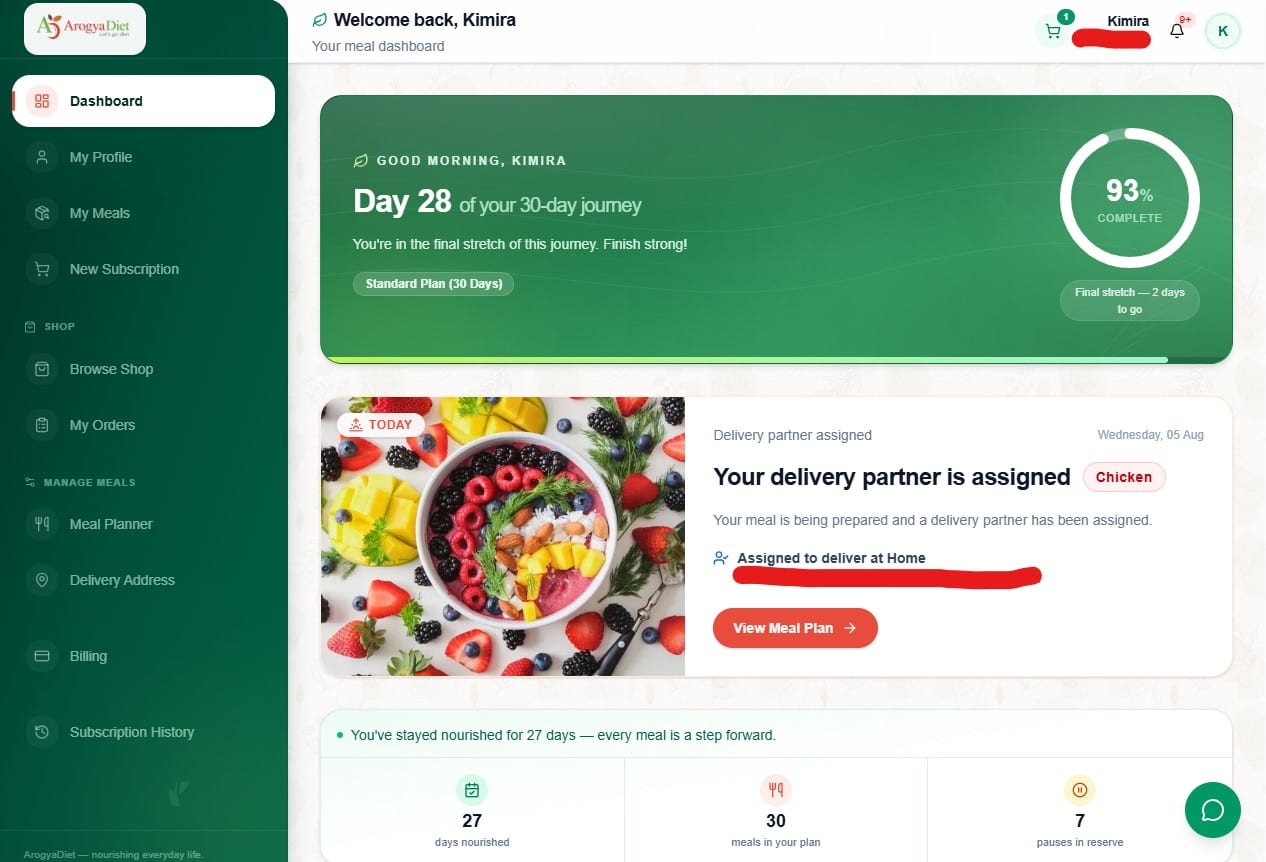
ArogyaDiet — customer ordering, rider tracking and admin/franchise dashboards.

Architecture in this build

  • Customer
  • Staff
  • Admin
ArogyaDiet
platform

ArogyaDiet

Multi-role operational web application

A food delivery and meal-subscription business needed customers, delivery riders, and franchise admins to work from one connected system instead of separate spreadsheets and phone calls.

  • Customer experience — meal plans & subscriptions
  • Rider experience — live delivery tracking
  • Admin & franchise dashboards — operational oversight
  • Role-based access across every user type
  • Payments integrated into the subscription flow
  • Next.js
  • Stripe
  • TypeScript
  • Tailwind
  • Supabase
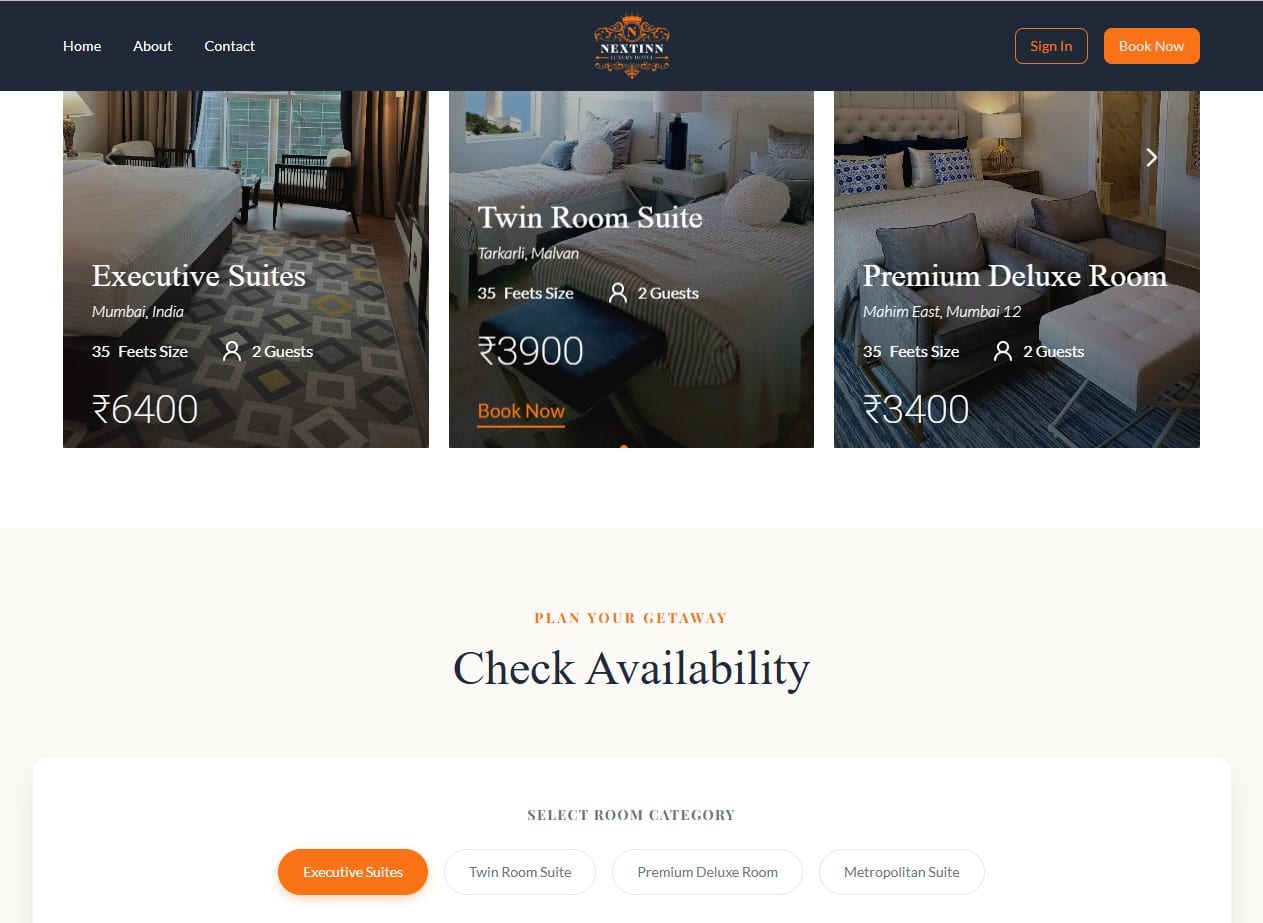
NextInn — guest booking flow alongside staff and admin dashboards.

Architecture in this build

  1. Requested
  2. Paid
  3. Confirmed
  4. Assigned
  5. Completed
platform

NextInn

Hospitality booking and management platform

A hospitality business wanted direct guest bookings and day-to-day operations running on one platform, instead of paying OTA commissions and coordinating manually.

  • Guest experience — live availability & booking
  • Staff & admin dashboards for daily operations
  • Review and performance oversight for ownership
  • Booking data connected end-to-end, not siloed
  • React
  • Redux
  • MongoDB
  • Express
  • Node.js
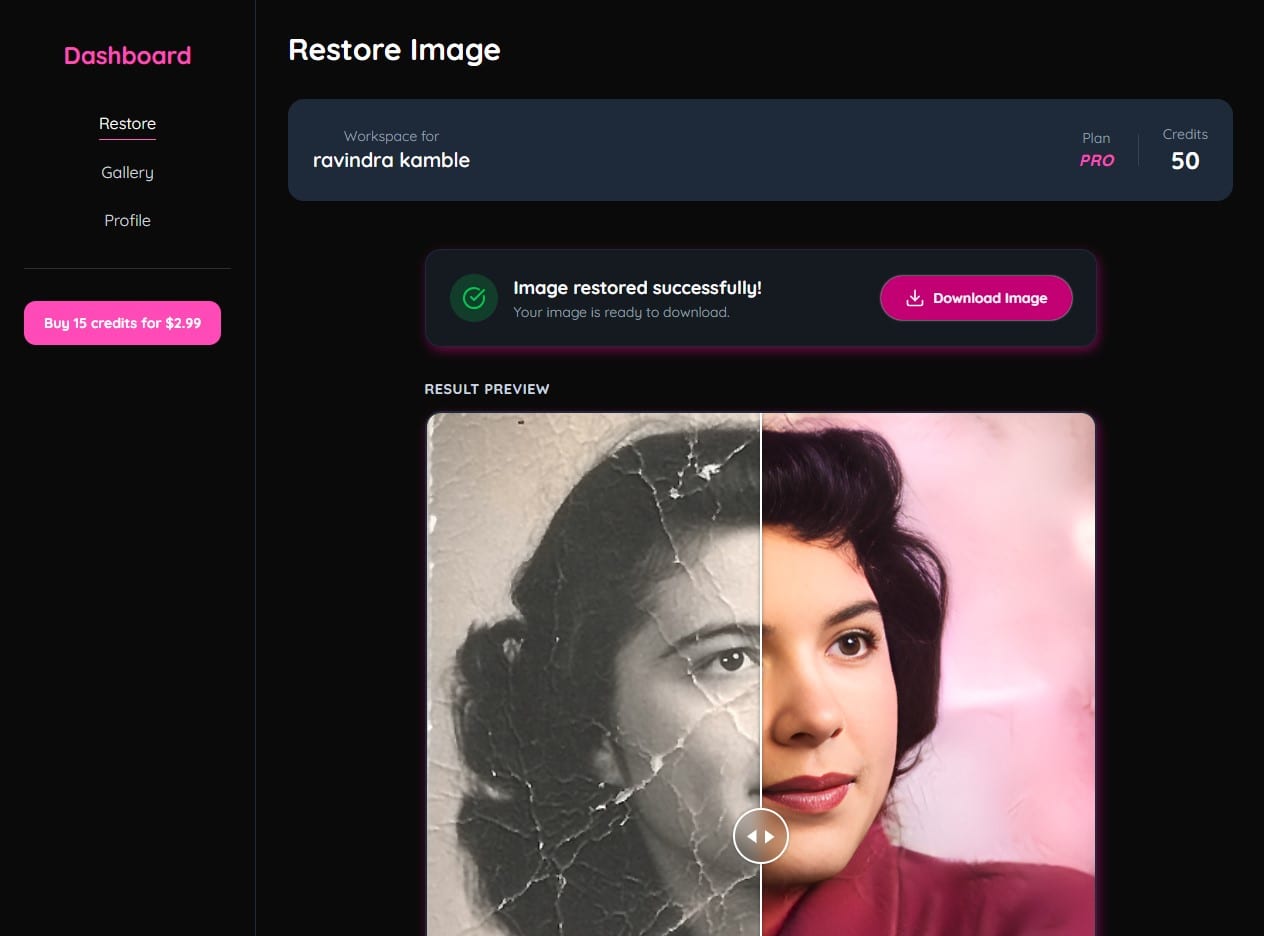
Phixl AI — upload, AI processing, restored result, and credit-based checkout.

Architecture in this build

  1. Upload
  2. AI Processing
  3. Result
  4. Credits & Payment
product

Phixl AI

AI-powered product / SaaS MVP

Turning an AI photo-restoration idea into a working product meant shipping a real user flow — uploads, processing, a credit system and payments — not just a demo of the AI model.

  • Upload → AI processing → restored result workflow
  • User accounts with a credit-based usage system
  • Payment integration for credit top-ups
  • Built and shipped as an MVP, iterated from usage
  • Next.js
  • Replicate AI
  • Supabase
  • TypeScript
  • Tailwind
  • Razorpay

These are builds we have engineered, not client case studies with measured results. We label metrics as estimated where no production analytics are wired in, and we never invent user counts, revenue or rankings.

WHAT WE CAN CONNECT & BUILD

Development Translated Into Business Function

Organized by what it does for your business, not by programming language.

Capture

  • Contact & lead forms
  • Appointment requests
  • Chat & chatbot integrations
  • WhatsApp click-to-chat
  • Social integrations
  • Lead notifications

WhatsApp click-to-chat and WhatsApp Business/API workflows are different levels of integration — we'll scope the right one for you.

Transact

  • Payments (Razorpay, Stripe)
  • Orders & checkout
  • Bookings & reservation flows
  • Payment status
  • Confirmation notifications

Operate

  • Admin dashboards
  • Customer portals
  • Staff dashboards
  • Role-based access
  • Workflow management
  • Reports & status changes

Connect

  • APIs & webhooks
  • CRM integrations
  • Email services
  • WhatsApp & social platforms
  • Analytics
  • CMS & external business systems

A service can automatically tell your system when something happens — such as a successful payment.

Extend

  • AI APIs & AI-powered features
  • New modules & dashboards
  • New integrations
  • MVP-to-product evolution

If the problem is a repetitive internal workflow rather than a customer-facing system, that belongs with our AI workflow automation service.

BUILT TO RUN, OWN & EVOLVE

What Happens After the Build

The technology discussion isn't the only thing that matters. Here's how we think about security, performance, ownership and what comes next.

Security & Access

  • Secure authentication & role-based access
  • Controlled permissions per user type
  • Protected data & appropriate session strategy
  • Secure payment-provider integrations

Performance & Reliability

  • Optimized frontend delivery & rendering strategy
  • Efficient data access, caching where useful
  • CDN/edge delivery where appropriate
  • Monitoring & backups where applicable

Ownership & Handover

  • Code ownership according to project agreement
  • Access to relevant services & accounts
  • Documentation & deployment information
  • Credentials handed over through secure processes

Post-Launch Evolution

  • New features & integrations
  • New user roles & additional dashboards
  • Additional automation
  • Product iterations over time

One platform, multiple businesses

Shared Platform
  • Business A
  • Business B
  • Business C

Each business's data stays logically separated.

We Choose the Stack Around the Product

Not every technology is used on every project. This is the range we build from — not a checklist every build ticks off.

Foundations
HTMLCSSJavaScript
Frontend
ReactNext.js
Backend
Node.jsExpressAPIs
Data
PostgreSQLSupabaseMongoDB
CMS
Sanity CMS
Authentication / Access
JWTRBACMulti-tenant
Payments
RazorpayStripe
AI
OpenAIAI APIs
Deployment / Infrastructure
VercelNetlifyCloud infrastructure
HOW WE BUILD

Five Phases, From Requirement to Live System

A disciplined progression from understanding the business problem to a system that keeps evolving after launch.

  1. 01

    UnderstandPhase 01Discover & Define

    We work out what the system has to do before anyone writes code.

    • Business goal
    • Users
    • Workflows
    • Required functionality
    • Integrations
    • Scope
    What you getA clear product/system scope.
  2. 02

    BlueprintPhase 02Architect

    You see the structure — data, roles and workflows — before the build starts.

    • System structure
    • Data model
    • Roles & permissions
    • Workflows
    • Integrations
    • Infrastructure direction
    What you getA technical blueprint before heavy development begins.
  3. 03

    BuildPhase 03Build

    You review working software in increments, not one final reveal.

    • Frontend
    • Backend
    • Database
    • APIs
    • Integrations
    • Dashboards
    • Business logic
    What you getWorking increments, not a single big-bang delivery.
  4. 04

    VerifyPhase 04Test & Validate

    Every flow that touches money, access or customer data is tested deliberately.

    • Functionality & forms
    • Workflows
    • Authentication & roles
    • Payments
    • Integrations
    • Responsive behavior
    • Security-sensitive flows
    What you getA system verified against real use, not just the happy path.
  5. 05

    LaunchPhase 05Launch & Evolve

    The system goes live, and you get what you need to run and extend it.

    • Deployment
    • Production configuration
    • Handover
    • Monitoring
    • Documentation
    • Post-launch improvements
    What you getA live system, with a path to keep improving it.
RIGHT-SIZED DEVELOPMENT

Frequently Asked Questions About Web Development

Not every business needs a custom application. We first understand the problem, then recommend the simplest system that can solve it properly.

If what you're building is a product other businesses would subscribe to rather than a system for your own operations, start with Custom SaaS Development.

Do I need a business website or a web application?

It depends on what the site needs to do, not how it should look. If you need to be found, contacted and to share information, a business website with forms, chat and CMS-managed content is usually enough. If you need logins, dashboards, roles or workflows, that's a web application. We help you figure out which one your business actually needs before we scope anything.

Can you add login to an existing website?

Yes, where the existing architecture and requirements support it. We review what you already have, then add authentication and the relevant dashboards or portals on top of it, rather than starting the whole project over.

Can my website accept payments?

Yes, through supported payment providers such as Razorpay or Stripe, depending on the project. The payment provider handles the transaction itself, while your application manages the order, booking or subscription around it.

Can you build booking or ordering systems?

Yes. We've built booking flows for hospitality (NextInn) and ordering/subscription flows for food delivery (ArogyaDiet), each with the admin tooling needed to manage them day to day.

Can you create separate customer and admin dashboards?

Yes. Separate, role-appropriate dashboards for customers, staff and admins are a core part of what we build — each user sees only the parts of the system relevant to them.

Can different users have different permissions?

Yes, through role-based access and appropriate authentication architecture. A customer, a staff member, an admin and a super admin can all use the same system while seeing different things and having different capabilities inside it.

Can you build a multi-tenant system?

Yes, where the business model requires one platform to serve multiple businesses, branches or tenants while keeping each organization's data logically separated.

Can you integrate our existing tools?

Yes, when APIs, webhooks or other supported integration mechanisms are available from the tools you already use — CRMs, email services, WhatsApp, analytics and other business systems.

Can you integrate WhatsApp with my website or system?

Yes, at the level your business actually needs. Click-to-chat simply opens a WhatsApp conversation with a pre-filled message, which suits most business websites. Sending automated confirmations or notifications through the WhatsApp Business API is a deeper integration with its own provider requirements, so we scope that separately once we know what you want the messages to do.

What happens after the system goes live?

Launch is a deployment, not the end of the project. We hand over the relevant access, deployment information and documentation, and from there the system can keep evolving — new features, additional user roles, extra dashboards, more integrations or further product iterations. Anything ongoing is agreed as its own scope rather than assumed.

Can you build an MVP first?

Yes. MVP scope focuses on the smallest useful product that can be launched and evaluated with real users, then improved based on what you learn — the same approach behind Phixl AI.

Who owns the code?

Code ownership follows the actual engagement and contract terms agreed for your project. We don't make a blanket promise here that overrides what's actually agreed — ask us directly and we'll be specific.

Can the system grow later?

Yes. We build with modular development in mind, so new features, roles, dashboards or integrations can be added later as the business grows, rather than requiring a rebuild.

Do you work only in Hyderabad?

We're based in Hyderabad and work with businesses there day to day, but we also work with businesses across India and internationally where the project is a good fit.

NEXT STEPS

Have a Business Process That Needs to Become a Working System?

Tell us what you need the website or application to do. We'll help you understand the right architecture, scope and next step — without technical jargon.

Available 24/7 · No high-pressure sales calls · Instant clarity.

Prefer to write the requirement down? Send us the details